WhatsApp Contactbeheer en Slimme Lijst
Met onze nieuwe functie kunnen gebruikers controleren of een bepaald contact op WhatsApp aanwezig is of niet. Dit veld kan worden gebruikt om een slimme lijst van contacten te maken die een geldig WhatsApp-nummer hebben om de algehele leverbaarheid te verhogen.
INHOUDSOPGAVE
Introductie van het "Geldig WhatsApp" veld op contactniveau
Begrijpen van het "Geldig WhatsApp" veld
Hoe deze functie te gebruiken
Hoe wordt het Geldig WhatsApp veld bijgewerkt
Wanneer een bericht met succes wordt afgeleverd op WhatsApp
Als een bericht niet kan worden afgeleverd of problemen met Meta ondervindt
Wanneer een contact een WhatsApp-bericht initieert
Als er geen conversatie is op WhatsApp
Hoe het Geldig WhatsApp veld te gebruiken
Hoe de Geldig WhatsApp-kolom aan de contactpagina toe te voegen
Hoe een slimme lijst te maken die Invalide WhatsApp-contacten uitsluit
FAQ: Veelgestelde vragen
Introductie van het "Geldig WhatsApp" veld op contactniveau
We hebben een nieuw veld genaamd "Geldig WhatsApp" op contactniveau geïntroduceerd om bedrijven te helpen de WhatsApp-status van hun contacten efficiënter te identificeren. Deze functie biedt duidelijke inzichten in of het telefoonnummer van een contact actief is op WhatsApp, waardoor communicatie soepeler en gerichter wordt.
Begrijpen van het "Geldig WhatsApp" veld
Het "Geldig WhatsApp" veld helpt bepalen of het WhatsApp-nummer van een contact beschikbaar is. Het omvat drie mogelijke statussen:
Is Geldig – Het telefoonnummer is actief op WhatsApp, wat betekent dat je berichten naar dit contact succesvol kunt verzenden.
Is Ongeldig – Het telefoonnummer is niet beschikbaar op WhatsApp, wat betekent dat het contact geen WhatsApp-berichten kan ontvangen.
Is Niet Gevalideerd – Het systeem heeft nog niet bevestigd of het telefoonnummer actief is op WhatsApp. Dit kan verdere validatie vereisen voordat je het contact kunt berichten.
Hoe deze functie te gebruiken
Met de "Geldig WhatsApp" filter kunnen bedrijven:
✔ Zorgen dat ze alleen actieve WhatsApp-gebruikers berichten.
✔ Vermijden berichten te sturen naar inactieve of niet-WhatsApp-nummers, waardoor mislukte afleverpogingen worden verminderd.
✔ Nummers identificeren die verdere validatie nodig hebben voordat berichten worden verzonden.
Deze functie helpt de efficiëntie, berichtlevering en algehele betrokkenheid bij contacten te verbeteren.
Hoe wordt het Geldig WhatsApp veld bijgewerkt
Wanneer een bericht met succes wordt afgeleverd op WhatsApp
Wanneer een bericht met succes wordt afgeleverd, markeert het systeem het contact automatisch als "Is Geldig".Als een bericht niet kan worden afgeleverd of problemen met Meta ondervindt
In gevallen waarin een bericht niet kan worden afgeleverd of problemen met Meta ondervindt, wordt het contact gemarkeerd als "Is Ongeldig".Wanneer een contact een WhatsApp-bericht initieert
Wanneer een contact een WhatsApp-bericht initieert, wordt de status bijgewerkt naar "Is Geldig", wat zorgt voor realtime validatie.Als er geen conversatie is op WhatsApp
Als er geen conversatie op WhatsApp is met een bepaald contact, blijft de status in de staat "Niet Gevalideerd" totdat er verdere interactie is.
Hoe het Geldig WhatsApp veld te gebruiken:
Filter contacten efficiënt
Profiteer van de filteropties om contacten te segmenteren op basis van hun WhatsApp-status. Voor gerichte outreach, filter contacten op basis van "Is Geldig" om actieve WhatsApp-gebruikers te bereiken.
Slimme lijstoptimalisatie
Optimaliseer je slimme lijsten door het "Geldig WhatsApp" veld op te nemen voor op maat gemaakte communicatiestrategieën.
Verbeterde inzichten
Krijg waardevolle inzichten in de responsiviteit en betrokkenheid van je WhatsApp-contacten.
Hoe de Geldig WhatsApp-kolom aan de contactpagina toe te voegen
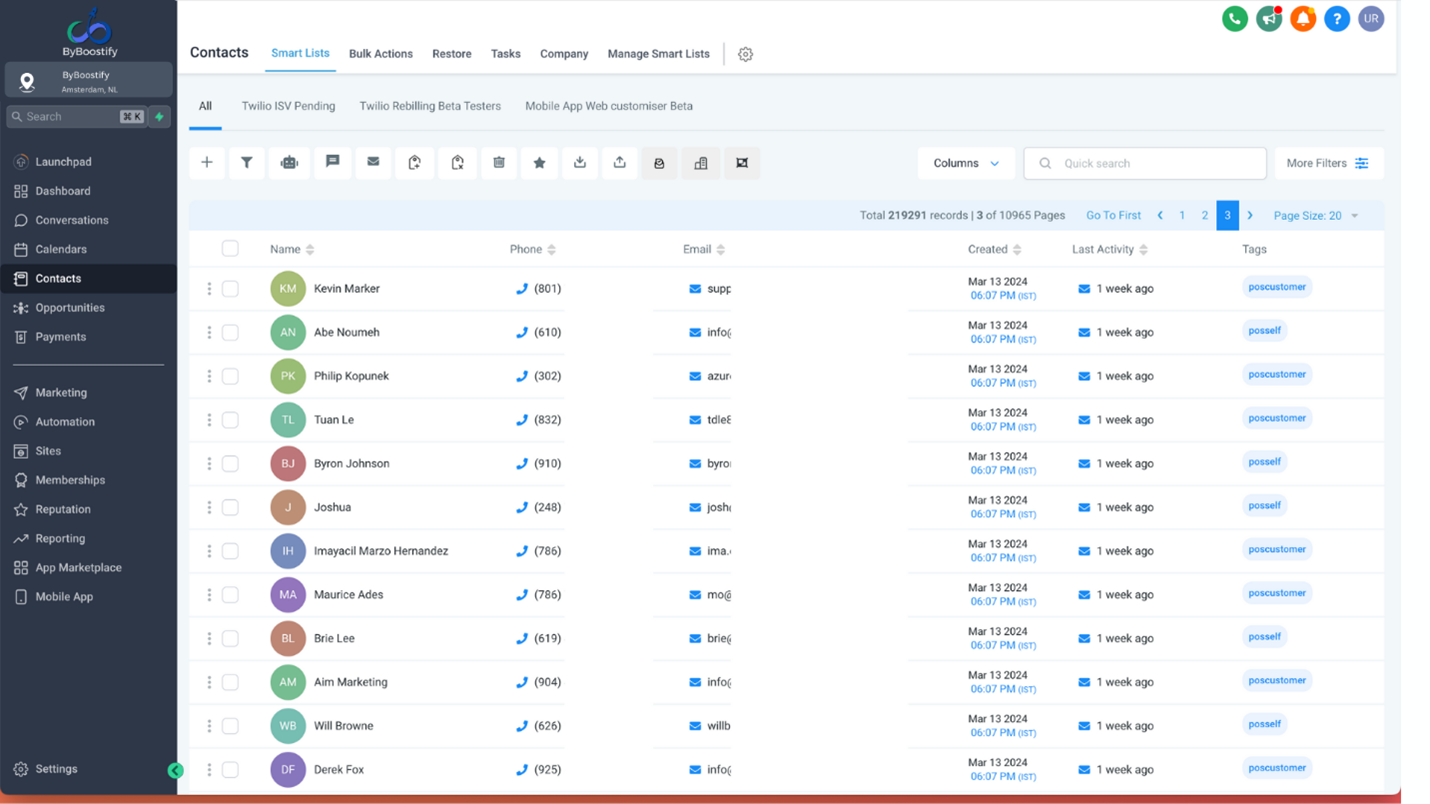
Stap 1: Ga naar het tabblad Contacten
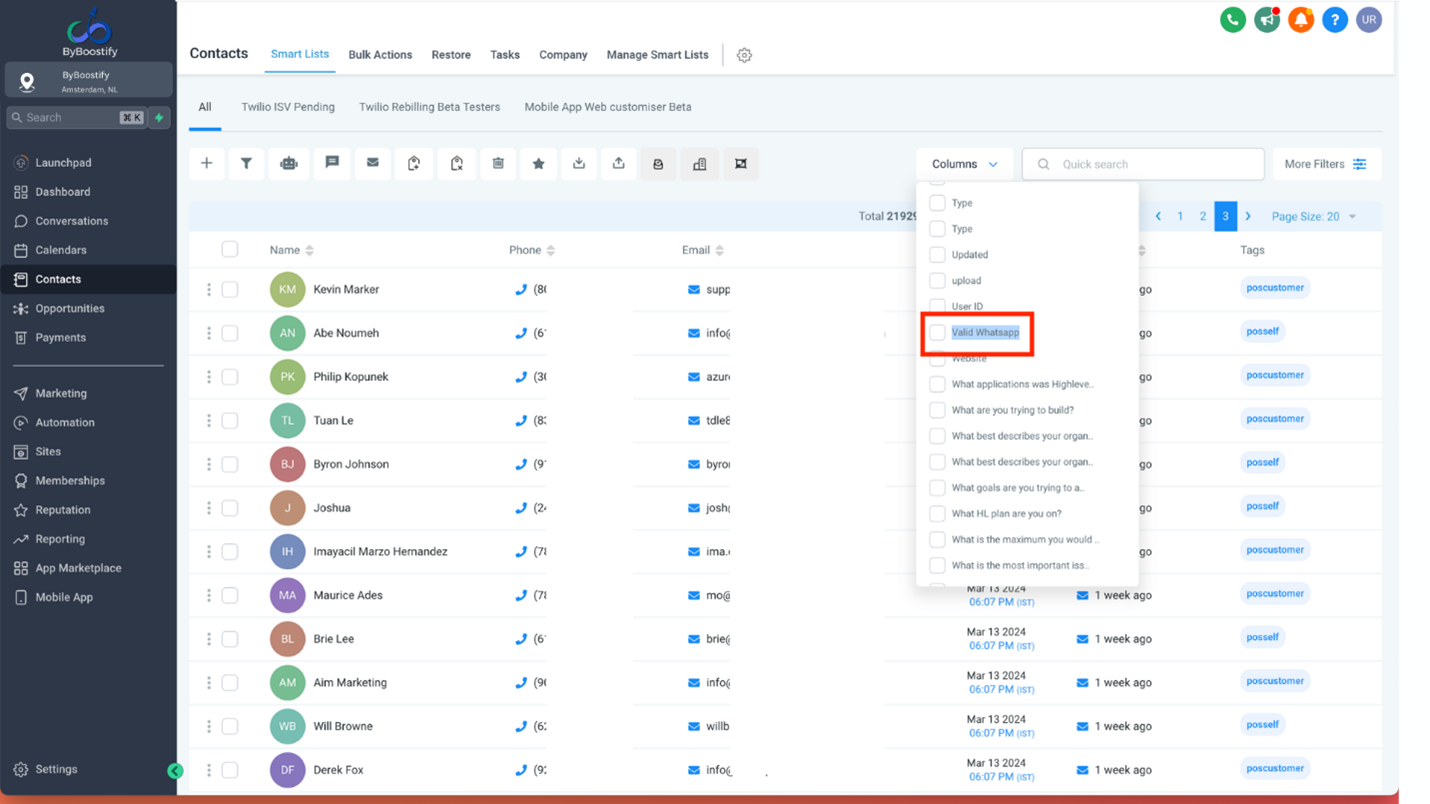
Stap 2: Klik op Kolommen en selecteer Geldig WhatsApp
Hoe een slimme lijst te maken die Invalide WhatsApp-contacten uitsluit
Stap 1: Ga naar de contactpagina en klik op Meer Filters

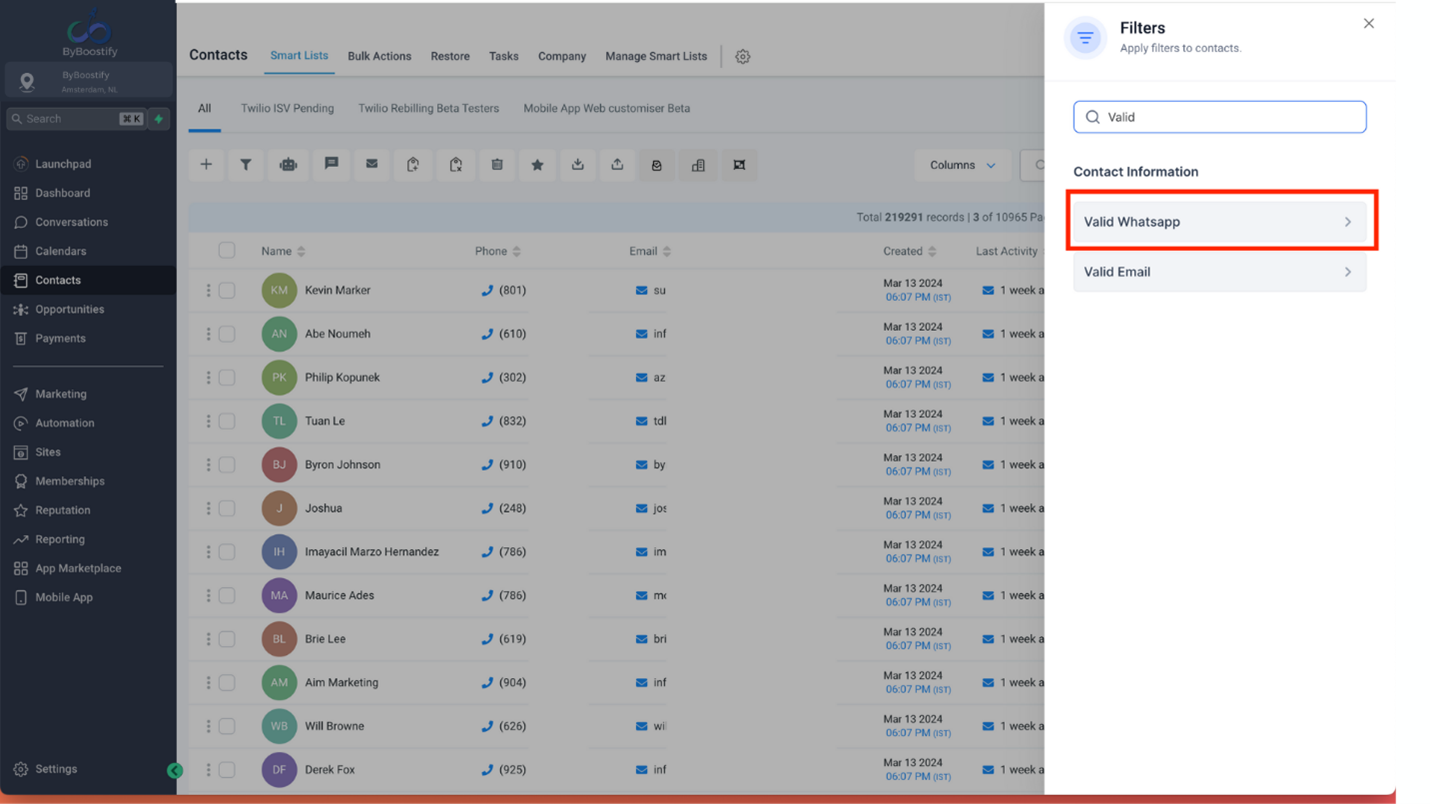
Stap 2: Zoek naar Geldig WhatsApp
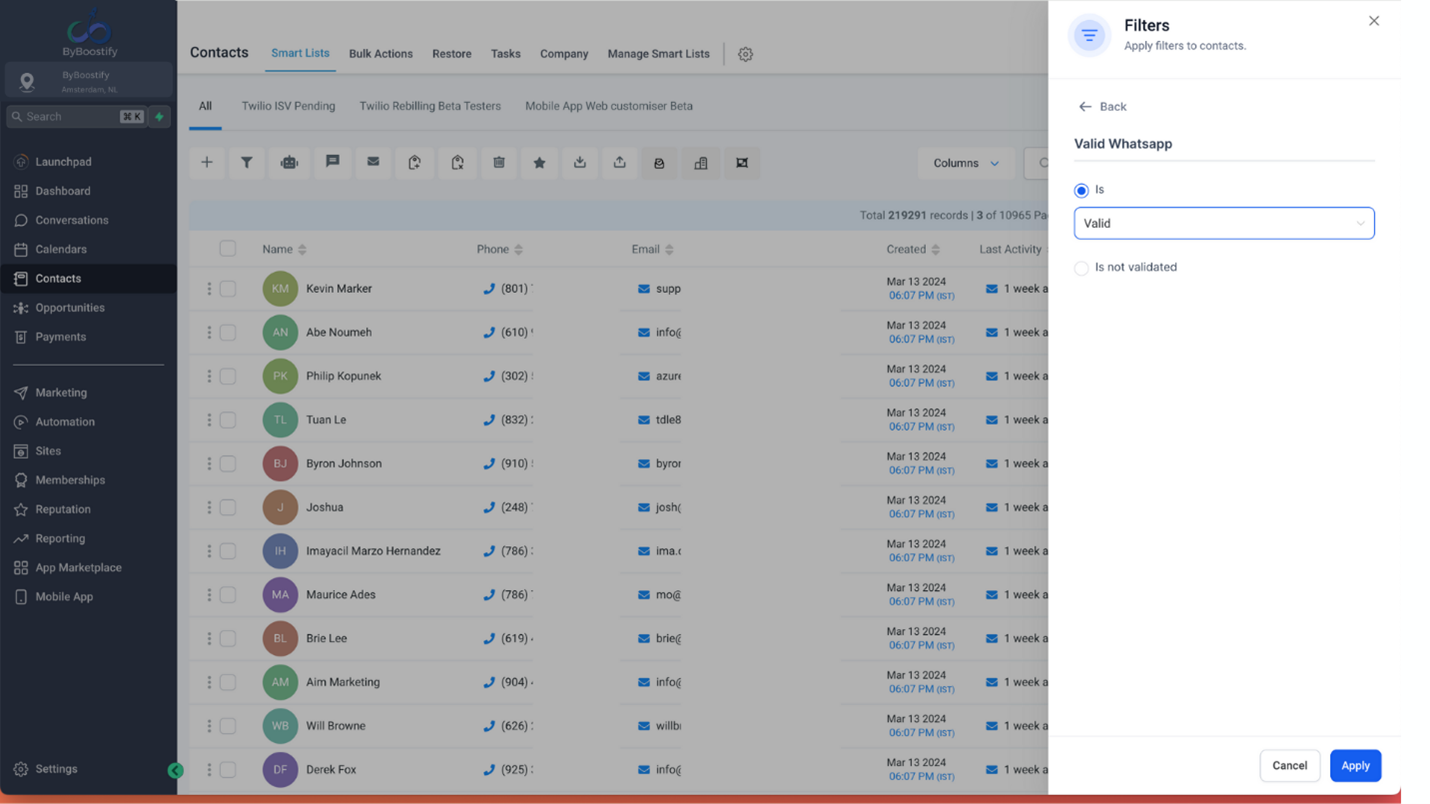
Stap 3: Selecteer is Geldig en klik op Toepassen
Stap 4: Selecteer de OF-voorwaarde en selecteer Is niet gevalideerd
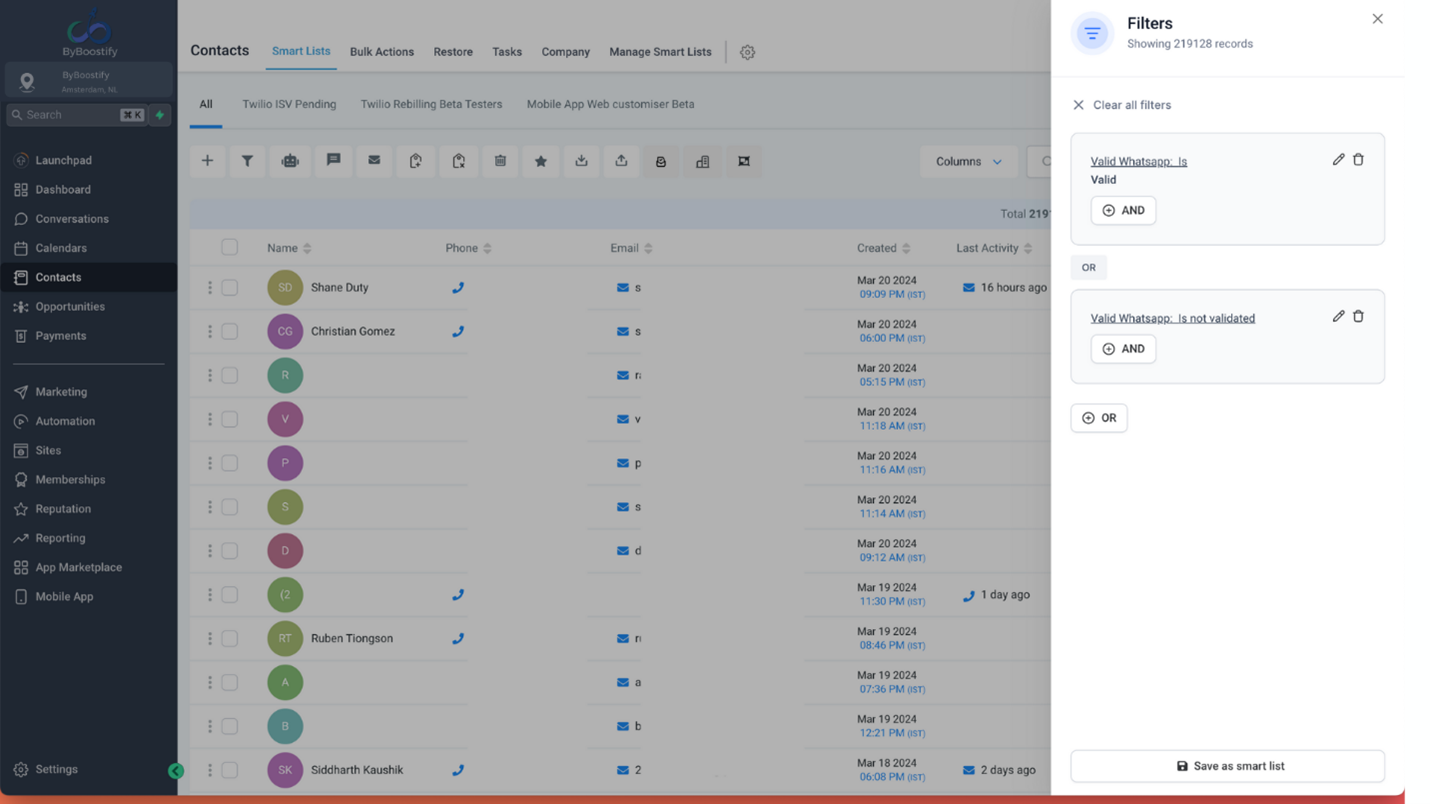
Stap 5: Klik op Opslaan als slimme lijst en geef een naam aan je slimme lijst
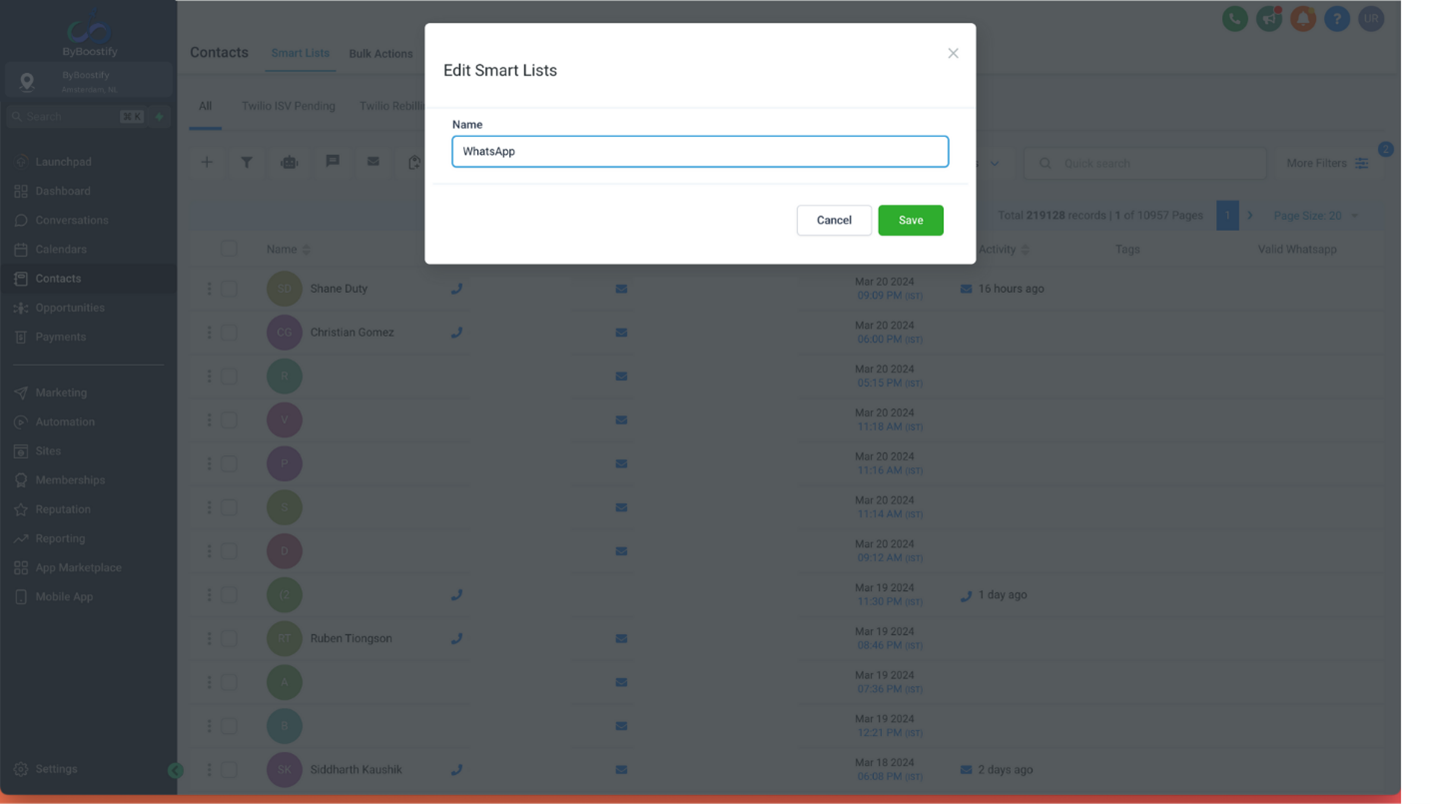
Deze slimme lijst wordt dynamisch bijgewerkt zodra een contact actief of inactief wordt op WhatsApp. Je kunt de hierboven gemaakte slimme lijst gebruiken om WhatsApp-campagnes te verzenden.
De reden voor het toevoegen van Is niet Gevalideerd contacten is om ervoor te zorgen dat WhatsApp-berichten worden verzonden naar contacten waarvan het systeem nog niet heeft vastgesteld of het contact op WhatsApp aanwezig is of niet vanwege geen WhatsApp-gesprekgeschiedenis.
FAQ: Veelgestelde vragen
Q: Hoe vaak worden deze velden bijgewerkt?
De velden worden in realtime bijgewerkt op basis van de gespecificeerde scenario's.
Q: Kan ik de WhatsApp-status van een contact handmatig bijwerken?
Nee, het systeem werkt de status automatisch bij op basis van gebruikersinteracties en de uitkomsten van berichtenleveringen.
Q: Wat is het "Geldig_WhatsApp" veld?
Het "Geldig_WhatsApp" veld is een nieuwe functie die je direct vertelt of het telefoonnummer van een contact geregistreerd en actief is op WhatsApp.
Q: Wat betekenen de verschillende "Geldig_WhatsApp" waarden?
Geldig: Het contact heeft een actief WhatsApp-account.
Ongeldig: Het nummer van het contact is momenteel niet op WhatsApp.
Niet Gevalideerd: Het systeem heeft nog niet bevestigd of het nummer op WhatsApp staat.
Q: Hoe wordt de "Geldig_WhatsApp" status bijgewerkt?
Het is automatisch! Hier is hoe het werkt:
Je verstuurt een bericht succesvol: De status verandert in "Geldig".
De levering van het bericht mislukt: De status verandert in "Ongeldig".
Het contact stuurt jou een bericht op WhatsApp: Hun status verandert onmiddellijk in "Geldig".
Q: Kan ik mijn contacten filteren op basis van hun WhatsApp-status?
Ja! Er is een nieuwe filter specifiek voor "Geldig WhatsApp". Gebruik het om alleen contacten te zien die je kunt bereiken op WhatsApp.
WhatsApp Contact Management and Smartlist
With our new feature, users can check if a particular contact is on WhatsApp or not. This field can be used to create a smart list of contacts who have a valid WhatsApp number to increase overall deliverability.
TABLE OF CONTENTS
Introducing the "Valid WhatsApp" Field at the Contact Level
Understanding the "Valid WhatsApp" Field
How to Use This Feature
How is the Valid WhatsApp Field Updated
When a Message is Successfully Delivered on WhatsApp
If a Message Fails to Deliver or Encounters Meta Issues
When a Contact Initiates a WhatsApp Message
If There is No Conversation Over WhatsApp
How to Utilize the Valid WhatsApp Field
How to Add the Valid WhatsApp Column in the Contacts Page
How to Create a Smart List Excluding Invalid WhatsApp Contacts
FAQs: Frequently Asked Questions
Introducing the "Valid WhatsApp" Field at the Contact Level
We have introduced a new field called "Valid WhatsApp" at the contact level to help businesses identify the WhatsApp status of their contacts more efficiently. This feature provides clear insights into whether a contact's phone number is active on WhatsApp, making communication smoother and more targeted.
Understanding the "Valid WhatsApp" Field
The "Valid WhatsApp" field helps determine the WhatsApp availability of a contact's phone number. It includes three possible statuses:
Is Valid – The phone number is active on WhatsApp, meaning you can send messages to this contact successfully.
Is Invalid – The phone number is not available on WhatsApp, meaning the contact cannot receive WhatsApp messages.
Is Not Validated – The system has not yet confirmed whether the phone number is active on WhatsApp. This may require further validation before messaging the contact.
How to Use This Feature
With the "Valid WhatsApp" filter, businesses can:
✔ Ensure they are messaging only active WhatsApp users.
✔ Avoid sending messages to inactive or non-WhatsApp numbers, reducing failed delivery attempts.
✔ Identify numbers that need further validation before sending messages.
This feature helps improve efficiency, message deliverability, and overall engagement with contacts.
How is the Valid WhatsApp Field Updated
When a Message is Successfully Delivered on WhatsApp
When a message is successfully delivered, the system automatically marks the contact as "Is Valid."If a Message Fails to Deliver or Encounters Meta Issues
In cases where a message fails to deliver or encounters issues with Meta, the contact is marked as "Is Invalid."When a Contact Initiates a WhatsApp Message
When a contact initiates a WhatsApp message, the status is updated to "Is Valid," ensuring real-time validation.If There is No Conversation Over WhatsApp
If there is no conversation over WhatsApp with a particular contact, the status remains in the "Not Validated" state until further interaction.
How to Utilize the Valid WhatsApp Field
Filter Contacts Efficiently
Leverage the filter options to segment contacts based on their WhatsApp status. For targeted outreach, filter contacts based on "Is Valid" to reach active WhatsApp users.
Smartlist Optimization
Optimize your Smartlists by incorporating the "Valid WhatsApp" field for tailored communication strategies.
Enhanced Insights
Gain valuable insights into the responsiveness and engagement levels of your WhatsApp contacts.
How to Add the Valid WhatsApp Column in the Contacts Page
Step 1: Go to Contacts tab
Step 2: Click on Columns and select Valid WhatsApp
How to Create a Smart List Excluding Invalid WhatsApp Contacts
Step 1: Go to Contacts page and click on More Filters
Step 2: Search for Valid WhatsApp
Step 3: Select is Valid and click Apply
Step 4: Select OR condition and select Is Not Validated
Step 5: Click Save as smart list and add a name to your smart list
This smart list will get dynamically updated as soon as a contact becomes active or inactive on WhatsApp. You can use the smart list created above to send WhatsApp campaigns.
The reason for adding Is Not Validated contacts is to ensure that WhatsApp messages are sent to contacts where the system has not yet determined whether the contact is on WhatsApp or not due to no WhatsApp conversation history.
FAQs: Frequently Asked Questions
Q: How often are these fields updated?
The fields are updated in real-time based on the specified scenarios.
Q: Can I manually update the WhatsApp status of a contact?
No, the system automatically updates the status based on user interactions and message delivery outcomes.
Q: What is the "Valid_WhatsApp" field?
The "Valid_WhatsApp" field is a new feature that tells you directly whether a contact's phone number is registered and active on WhatsApp.
Q: What do the different "Valid_WhatsApp" values mean?
Valid: The contact has an active WhatsApp account.
Invalid: The contact's number is not currently on WhatsApp.
Not Validated: The system hasn't yet confirmed if the number is on WhatsApp.
Q: How does the "Valid_WhatsApp" status get updated?
It's automatic! Here's how it works:
You send a message successfully: The status changes to "Valid."
Message delivery fails: The status changes to "Invalid."
Contact messages you on WhatsApp: Their status instantly changes to "Valid."
Q: Can I filter my contacts based on their WhatsApp status?
Yes! There's a new filter specifically for "Valid WhatsApp." Use it to see only contacts you can reach on WhatsApp.