Hoe maak je een Automatisering: Formulier Ingevuld → WhatsApp Bedankbericht + Kortingscoupon per E-mail
Met deze handleiding stel je een automatisering in ByBoostify (op basis van Go HighLevel) in die automatisch een WhatsApp-bedankbericht en een follow-up e-mail met kortingscoupon verstuurt zodra iemand een formulier invult.
Stap 1: Maak de Automatisering
Ga in je ByBoostify-dashboard naar Automatisering > Workflows.
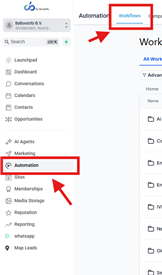
Klik op + Nieuwe Workflow.

Kies Begin vanaf nul (of gebruik een template indien beschikbaar).

Stap 2: Voeg de Trigger toe
Klik op + Trigger toevoegen.

Selecteer Formulier Ingevuld als trigger-gebeurtenis.

Kies het specifieke formulier dat je wilt koppelen.

Sla de trigger op.

Stap 3: Voeg Actie toe – WhatsApp Bedankbericht
Klik onder de trigger op + Actie toevoegen.

Selecteer WhatsApp-bericht versturen.

Schrijf je bedankbericht, bijvoorbeeld:
“Hoi [Voornaam], bedankt voor het invullen van ons formulier! We nemen snel contact met je op.”
Sla de actie op.
Stap 4: Voeg Actie toe – E-mail met Kortingscoupon
Klik opnieuw op + Actie toevoegen.

Selecteer E-mail versturen.
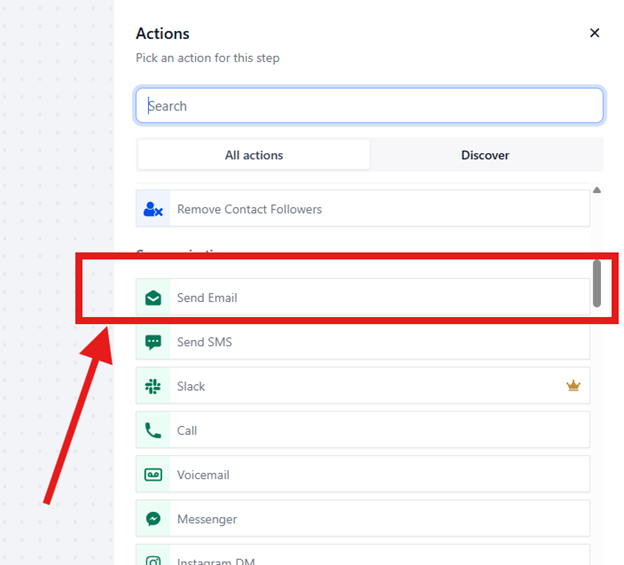
Schrijf je e-mail en voeg de kortingscoupon toe. Bijvoorbeeld:
Onderwerp: “Jouw bedankcadeau 🎁”
Tekst:
“Bedankt voor het invullen van het formulier! Als blijk van waardering ontvang je hierbij je exclusieve kortingscode: SAVE20. Gebruik deze code bij het afrekenen en ontvang 20% korting.”
Sla de e-mail op.
Stap 5: Activeer de Workflow
Controleer je stappen in de workflow.
Zet de workflow van Concept naar Actief.
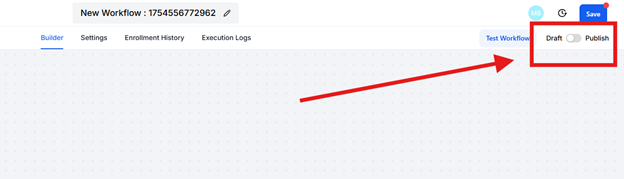
Test door zelf het formulier in te vullen en controleer:
Het WhatsApp-bericht wordt direct verstuurd.
De e-mail met kortingscode komt in je inbox aan.
Handige Tips
Voeg een korte vertraging (1–2 minuten) toe vóór de e-mail om het natuurlijker te laten lijken.
Gebruik custom values (zoals [Voornaam]) voor meer personalisatie in WhatsApp en e-mail.
Heb je meerdere campagnes? Gebruik dan filters/condities om verschillende kortingscodes te versturen afhankelijk van het ingevulde formulier.
How to Create an Automation for Form Submission → Thank You WhatsApp + Discount Email
This guide shows you how to set up an automation in ByBoostify that automatically sends a WhatsApp thank you message and a follow-up email with a discount coupon when someone submits a form.
Step 1: Create the Automation
In your ByBoostify dashboard, go to Automation > Workflows.
Click + Create Workflow.
Choose Start from Scratch (or use a template if available).
Step 2: Add the Trigger
Click + Add Trigger.
Select Form Submitted as the trigger event.
Choose the specific form you want to connect.
Save the trigger.
Step 3: Add Action – Send WhatsApp Message
Under the trigger, click + Add Action.
Select Send WhatsApp Message.
Write your thank you message, for example:
“Hi [First Name], thank you for filling out our form! We’ll get back to you shortly.”
Save the action.
Step 4: Add Action – Send Email with Discount Coupon
Click + Add Action.
Select Send Email.
In the email editor, write your message and include the discount coupon. Example:
Subject: “Here’s your Thank You Gift 🎁”
Body:
“Thanks for submitting the form! As a token of our appreciation, here’s your exclusive discount coupon: SAVE20. Use it at checkout to enjoy 20% off.”
Save the email.
Step 5: Activate the Workflow
Double-check your automation steps.
Toggle the workflow from Draft to Published.
Test by submitting the form yourself to confirm:
WhatsApp message is sent immediately.
Email with discount coupon arrives in inbox.
Pro Tips
Add a short delay (1–2 minutes) before the email to make it feel natural.
Use custom values (like [First Name]) to personalize the WhatsApp and email.
If you run multiple campaigns, use conditions/filters to send different discount codes based on the form submitted.