Hoe Dubbele Contacten Samen te Voegen in ByBoostify
Dit artikel begeleidt je stap voor stap bij het samenvoegen van dubbele contactrecords binnen een ByBoostify-subaccount. Dit helpt je CRM op te schonen, de communicatie te verbeteren en een georganiseerde contactenlijst te behouden.
INHOUDSOPGAVE
Wat is het Samenvoegen van Dubbele Contacten?
Belangrijkste Voordelen van het Samenvoegen van Dubbele Contacten
Stappen om Dubbele Contacten Samen te Voegen
Veelgestelde Vragen
Gerelateerde Artikelen
Wat is het Samenvoegen van Dubbele Contacten?
Het samenvoegen van dubbele contacten in ByBoostify stelt je in staat om meerdere records van dezelfde persoon of organisatie samen te voegen tot één uniform contact. Dit vermindert verwarring, voorkomt dubbele communicatie en zorgt voor een schone contactdatabase.
Dubbele contacten kunnen ontstaan door handmatige invoer, CSV-imports, formulierinzendingen of integraties van derden zoals Zapier. ByBoostify identificeert dubbele contacten op basis van overeenkomende velden, zoals namen, e-mails of telefoonnummers.
Belangrijkste Voordelen van het Samenvoegen van Dubbele Contacten
Zorgt voor gegevenshygiëne in het CRM en voorkomt dubbele communicatie.
Combineert notities, taken, gesprekken en workflows in één record.
Verbetert de nauwkeurigheid van campagnes en rapportages.
Vermindert verwarring bij ondersteuning en verkoopopvolging.
Optimaliseert automatisering en routering van contacten.
Stappen om Dubbele Contacten Samen te Voegen
Stap 1: Zoek Dubbele Contacten
Ga naar de sectie Contacten in je ByBoostify-subaccount.
Gebruik de QuickSearch-balk om dubbele contacten te vinden door een gemeenschappelijke identificatie, zoals naam of e-mail, in te voeren.
Je kunt ook handmatig zoeken vanuit de contactenlijst.
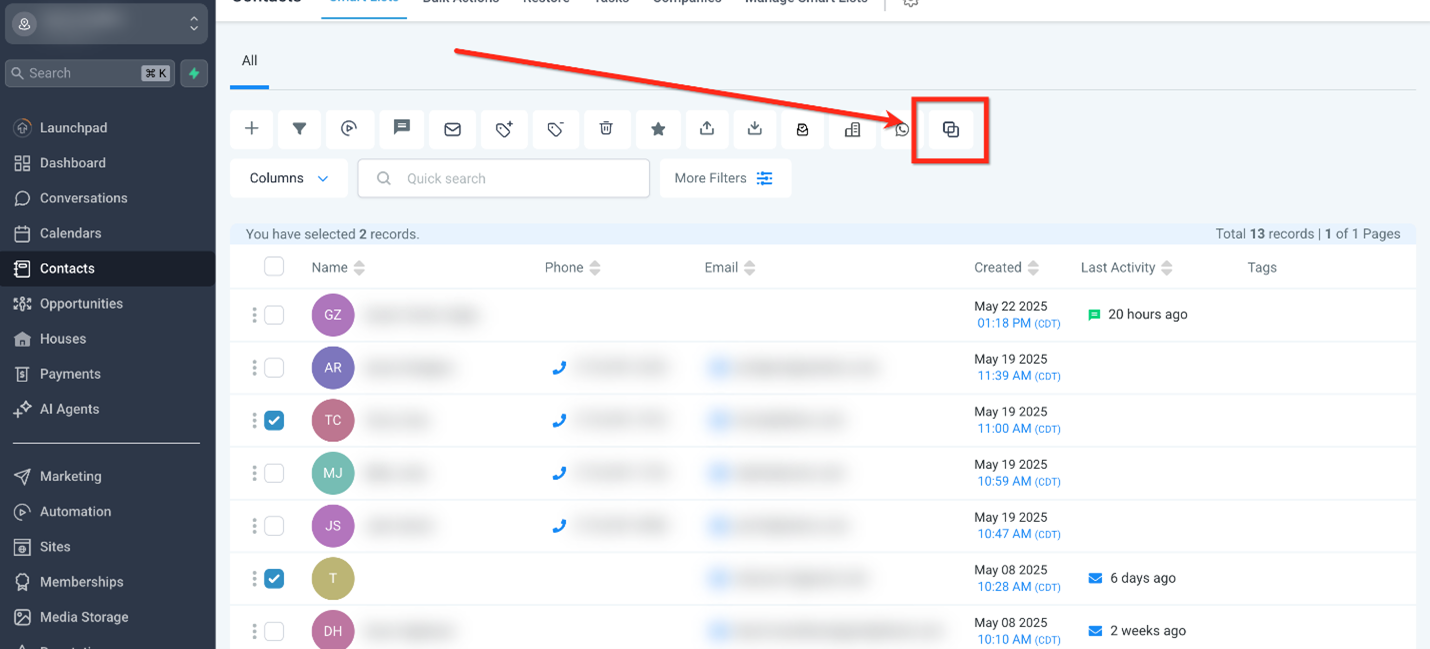
Selecteer de dubbele contacten die je wilt samenvoegen. (Maximaal 10 tegelijk)

Stap 2: Start het Samenvoegproces
Nadat je de contacten hebt geselecteerd, klik je op de knop Contacten Samenvoegen.
Stap 3: Kies het Hoofdrecord (Master Contact)
Het kiezen van het hoofdrecord zorgt ervoor dat de primaire gegevens behouden blijven tijdens het samenvoegen, terwijl relevante informatie uit de andere records eraan wordt toegevoegd om één volledig contact te vormen.
Controleer de details van de geselecteerde contacten.
Selecteer het Hoofdcontact.
Je kunt ook het primaire e-mailadres of telefoonnummer kiezen voor het hoofdcontact uit een van de geselecteerde contacten.
Klik op de knop Contacten Samenvoegen.
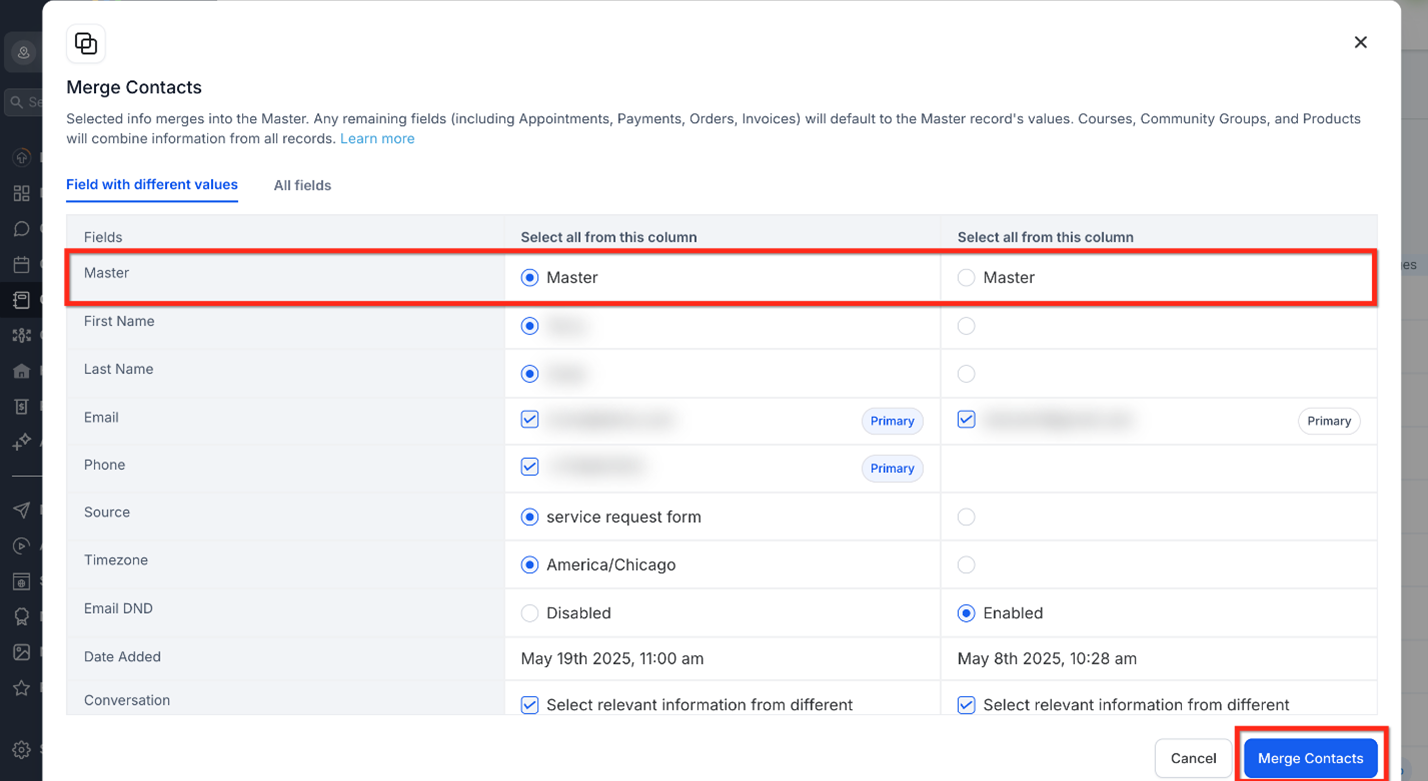
Belangrijk: Tijdens het samenvoegen behoudt het hoofdcontact alle hoofdgegevens. Informatie uit het secundaire (child) contact gaat permanent verloren; controleer zorgvuldig voordat je bevestigt.
Stap 4: Bevestig het Samenvoegen
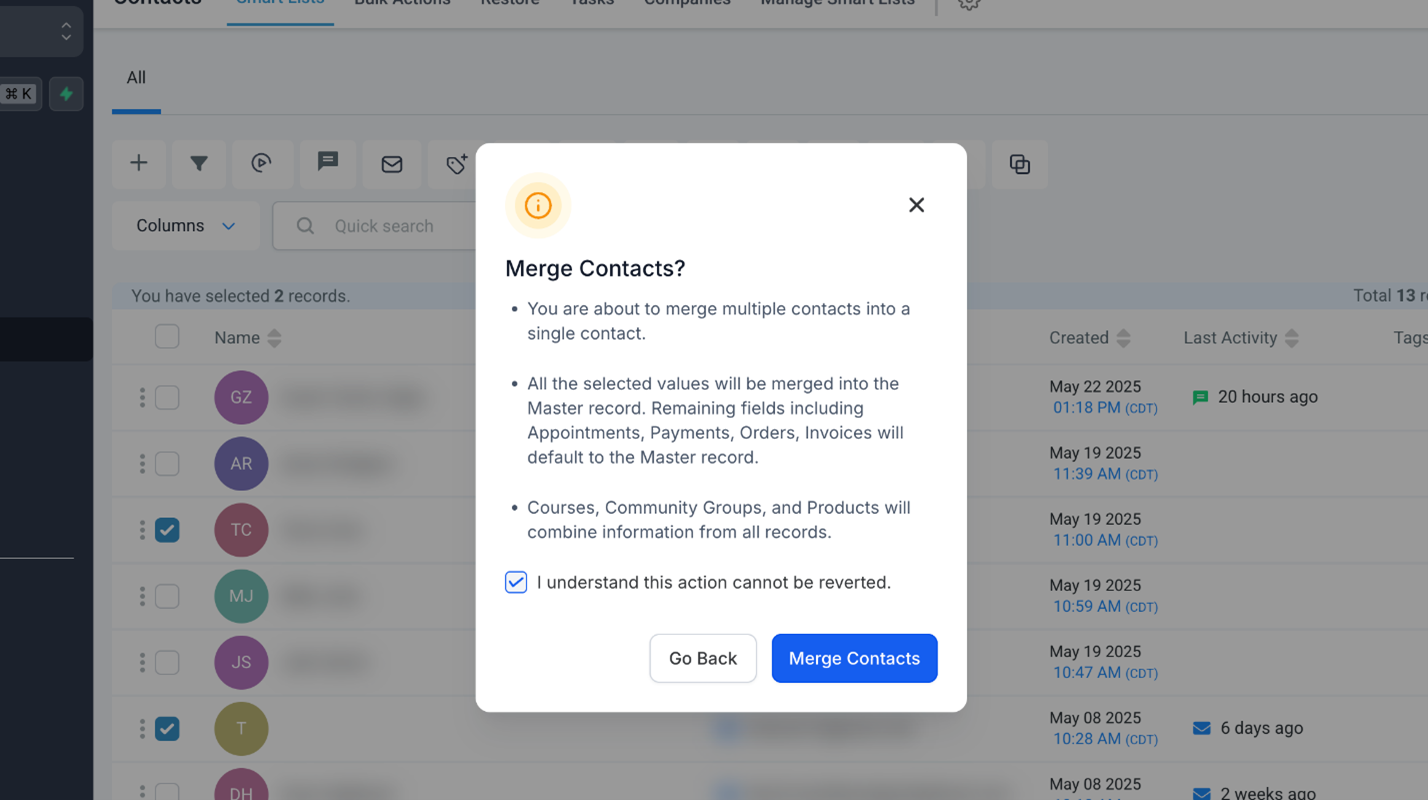
Vink het vakje aan bij “Ik begrijp dat deze actie niet ongedaan kan worden gemaakt.”
Klik op de knop Contacten Samenvoegen.
Voorkeuren voor Contactdeduplicatie
Het voorkomen van dubbele contacten bij de bron bespaart later veel tijd en verwarring. Met de instellingen voor contactdeduplicatie bepaal je hoe het systeem nieuwe contactrecords behandelt, zodat je duplicaten kunt voorkomen voordat ze ontstaan.
Ga naar Instellingen > Bedrijfsprofiel > Contactvoorkeuren.
Schakel “Dubbele Contacten Toestaan” in of uit.
Kies primaire en secundaire deduplicatievelden (E-mail of Telefoon).

Veelgestelde Vragen
V: Kan ik contacten samenvoegen via de LeadConnector mobiele app?
Momenteel is het samenvoegen van contacten niet beschikbaar in de LeadConnector mobiele app. Deze functie staat gepland voor release in kwartaal 3, samen met extra bulkacties. In de tussentijd kun je contacten samenvoegen via de desktopversie van ByBoostify.
V: Wat gebeurt er met veldgegevens tijdens het samenvoegen?
Het geselecteerde hoofdrecord behoudt zijn gegevens, terwijl unieke velden van andere records eraan worden toegevoegd.
V: Waarom zie ik de knop “Contacten Samenvoegen” niet?
De knop “Contacten Samenvoegen” verschijnt alleen wanneer je 2 of meer geldige contacten selecteert (maximaal 10). Als de contacten die je probeert samen te voegen belangrijke velden missen (zoals naam, e-mail of telefoonnummer), staat het systeem samenvoegen niet toe. Controleer ook dat:
Je beheerdersrechten hebt om contacten te beheren.
Je contacten selecteert binnen hetzelfde subaccount.
Beide contacten zichtbaar zijn in je contactenlijstweergave (controleer filters).
V: Kan ik contacten in bulk samenvoegen?
Nee, je kunt maximaal 10 contacten tegelijk samenvoegen.
V: Waardoor ontstaan dubbele contacten in ByBoostify?
Dubbele contacten kunnen ontstaan door handmatige invoer, CSV-imports, formulieren of tools van derden zoals Zapier.
V: Worden aangepaste waarden of velden beïnvloed?
Aangepaste velden van het secundaire contact worden alleen toegevoegd als het corresponderende veld leeg is in het primaire contact. Er vindt geen overschrijving plaats.
V: Hoe weet ik welk contact ik als hoofdcontact moet kiezen?
Kies het record met de meest nauwkeurige en actuele informatie. Het hoofdcontact behoudt gesprekken, laatste activiteit, bestanden en andere gegevens.
V: Kan ByBoostify automatisch alle dubbele contacten voor mij vinden?
Nee. Je kunt handmatig zoeken op naam, telefoon of e-mail, maar ByBoostify biedt momenteel geen volledige database-scan voor duplicaten.
V: Hoe voorkom ik duplicaten via formulier- of agenda-inzendingen?
Zorg ervoor dat “Dubbele Contacten Toestaan” is uitgeschakeld in je deduplicatie-instellingen.
How to Merge Duplicate Contacts in ByBoostify
This article walks you through how to merge duplicate contact records within a ByBoostify sub-account, helping you clean up your CRM, improve communication accuracy, and maintain a streamlined contact list.
TABLE OF CONTENTS
What is Merging Duplicate Contacts?
Key Benefits of Merging Duplicate Contacts
Steps to Merge Duplicate Contacts
Frequently Asked Questions
Related Articles
What is Merging Duplicate Contacts?
Merging duplicate contacts in ByBoostify allows you to consolidate multiple records for the same individual or business into one unified contact. This helps reduce confusion, eliminate redundant communications, and ensure a clean contact database.
Duplicates can occur from manual entry, CSV imports, form submissions, or third-party integrations like Zapier. ByBoostify identifies duplicates based on matching fields, such as names, emails, or phone numbers.
Key Benefits of Merging Duplicate Contacts
Ensures CRM data hygiene and prevents duplicate outreach.
Combines notes, tasks, conversations, and workflows into one record.
Improves campaign accuracy and reporting.
Reduces confusion during support and sales follow-ups.
Optimizes automation and contact routing.
Steps to Merge Duplicate Contacts
Step 1: Find Duplicate Contacts
Navigate to the Contacts from your ByBoostify sub-account.
Use the QuickSearch bar to find duplicate contacts by entering a common identifier like name or email.
You can also search manually from the contact list.
Select the duplicate contacts you want to merge. (Maximum 10 at a time)
Step 2: Initiate the Merge Process
After selecting the contacts, click on the Merge Contacts button.
Step 3: Choose the Master Record
Choosing the Master Record ensures its primary details are preserved during the merge, while relevant data from the other records is combined into it to create a single, complete contact.
Review the details of the selected contacts.
Select the Master Contact.
You can also select the Primary Email/Phone for the Master contact from any of the selected contacts.
Click on Merge Contacts button.
Important: When merging, the Master Contact keeps all key data. Info from the Child Contact is permanently lost; review carefully before confirming.
Step 4: Confirm the Merge
Check the I understand this action cannot be reverted box.
Click on Merge Contacts button.
Contact Deduplication Preferences
Avoiding duplicate contacts at the source can save significant time and confusion later. Contact Deduplication Settings give you control over how the system handles new contact entries, allowing you to prevent duplicates before they happen.
Navigate to Settings > Business Profile > Contact Preferences.
Enable or disable Allow Duplicate Contacts.
Choose primary and secondary deduplication fields (Email or Phone).
Frequently Asked Questions
Q: Can I merge contacts using the LeadConnector mobile app?
Currently, the ability to merge contacts is not available in the LeadConnector mobile app. This feature is planned for release in Q3, along with additional bulk actions. In the meantime, you can merge contacts using the desktop version of ByBoostify.
Q: What happens to field data during a merge?
The selected master record retains its details, while unique fields from other records are added to it.
Q: Why don’t I see the “Merge Contacts” button?
The “Merge Contacts” button only appears when you select 2 or more valid contacts (up to a maximum of 10). If the contacts you’re trying to merge are missing key fields (like a name, email, or phone number), the system may not allow a merge. Additionally, ensure that:
You have admin permissions to manage contacts.
You’re selecting contacts from the same sub-account.
Both contacts are visible in your contact list view (check filters).
Q: Can I merge contacts in bulk?
No, you can merge up to 10 contacts at a time.
Q: What causes duplicate contacts in ByBoostify?
Duplicates can come from manual entry, CSV import, forms, or third-party tools like Zapier.
Q: Will the contact's custom values or fields be affected?
Custom fields from the secondary contact will only be added if the corresponding field is blank in the primary. No overwriting will occur.
Q: How do I know which contact to choose as the master?
Choose the record with the most accurate and up-to-date information. The master contact retains conversations, last activity, files, and other data.
Q: Can ByBoostify automatically find all duplicate contacts for me?
No. While you can manually search by name, phone, or email, ByBoostify does not currently offer a full database scan for duplicates.
Q: How do I prevent duplicates from form or calendar submissions?
Make sure “Allow Duplicate Contacts” is turned off in your deduplication settings.