Hoe Beheer je Meerdere E-mailadressen voor een Contact
Dit artikel laat je zien hoe je meerdere e-mailadressen voor een enkel contact in Byboostify kunt beheren en toevoegen! Je kunt handmatig tot 10 extra e-mailadressen per contact toevoegen (exclusief het primaire e-mailadres), een primair e-mailadres voor campagnes aanwijzen, meerdere e-mailvelden importeren via CSV, en zelfs dubbele contacten samenvoegen terwijl je hun e-mails behoudt.
INHOUDSOPGAVE
Wat is het Beheren van Meerdere E-mails in Contacten?
Belangrijke Voordelen van het Beheren van Meerdere E-mails
Hoe Extra E-mailadressen aan een Contact Toe te Voegen
Het Selecteren van het Primaire E-mailadres
Veelgestelde Vragen
Gerelateerde Artikelen
Wat is het Beheren van Meerdere E-mails in Contacten?
Byboostify stelt je in staat om meerdere e-mailadressen—tot 11—aan een enkel contactprofiel te koppelen. Dit is vooral nuttig voor contacten die verschillende e-mailadressen gebruiken voor persoonlijke, zakelijke of projectgebonden communicatie. Je kunt deze adressen op één plek opslaan en een primair adres aanwijzen voor alle uitgaande berichten, wat je helpt om je communicatie gecentraliseerd en nauwkeurig te houden.
Belangrijke Voordelen van het Beheren van Meerdere E-mails
Het beheren van meerdere e-mails voor een enkel contact stroomlijnt de communicatie en voorkomt dubbele invoer in je CRM.
Onderhoud meerdere e-mailadressen onder één verenigd contactprofiel.
Wijs één primair e-mailadres toe voor alle uitgaande communicatie.
Bewaar secundaire e-mailadressen voor toekomstige ondersteuning of tracking.
Importeer meerdere e-mails voor een contact met behulp van CSV-import.
Voeg dubbele contacten samen en behoud alle bijbehorende e-mailadressen.
Hoe Extra E-mailadressen aan een Contact Toe te Voegen
Soms kan een contact meerdere e-mailadressen gebruiken voor verschillende doeleinden—zakelijke, persoonlijke of projectgebonden communicatie. Byboostify stelt je in staat om tot 11 e-mailadressen per contact op te slaan, zodat alle relevante e-mails toegankelijk zijn binnen één profiel. Je kunt handmatig tot 11 e-mailadressen per contact toevoegen.
Stap 1
Navigeer naar Contacten en open een contactprofiel.
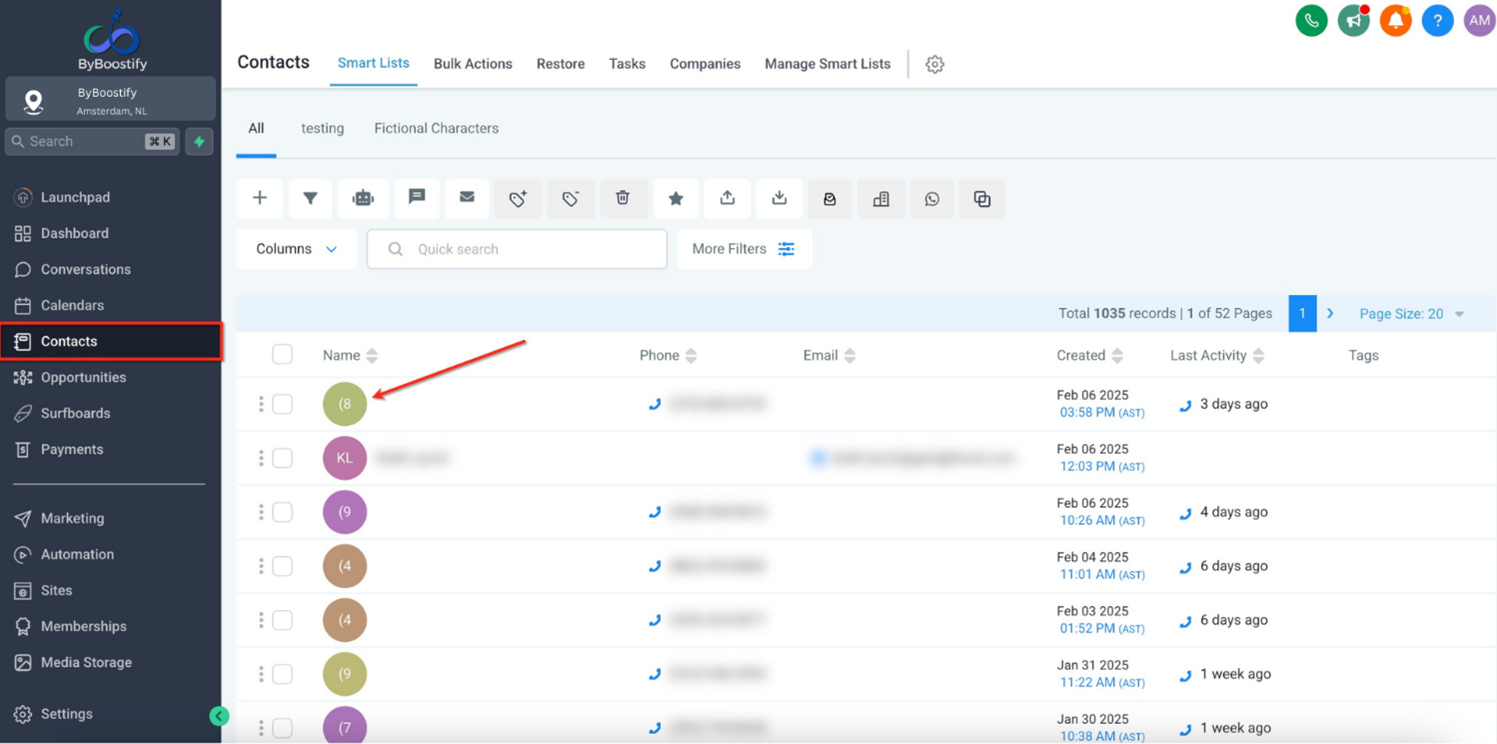
Stap 2
Klik op de Contact-knop en scroll naar het veld E-mailadres.
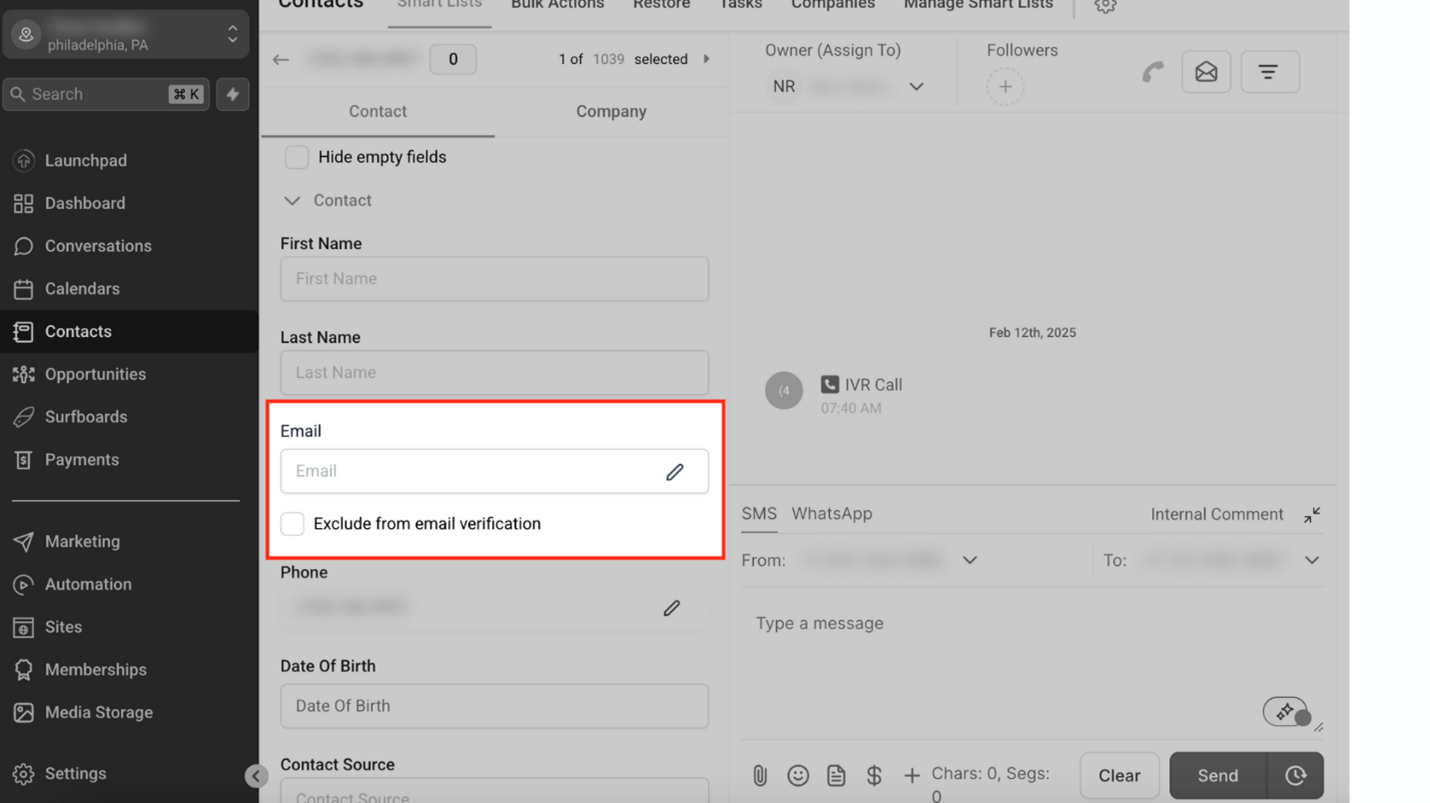
Stap 3
Klik op "Voeg Een Ander E-mailadres Toe," voer het nieuwe e-mailadres in en klik op Wijzigingen Opslaan.
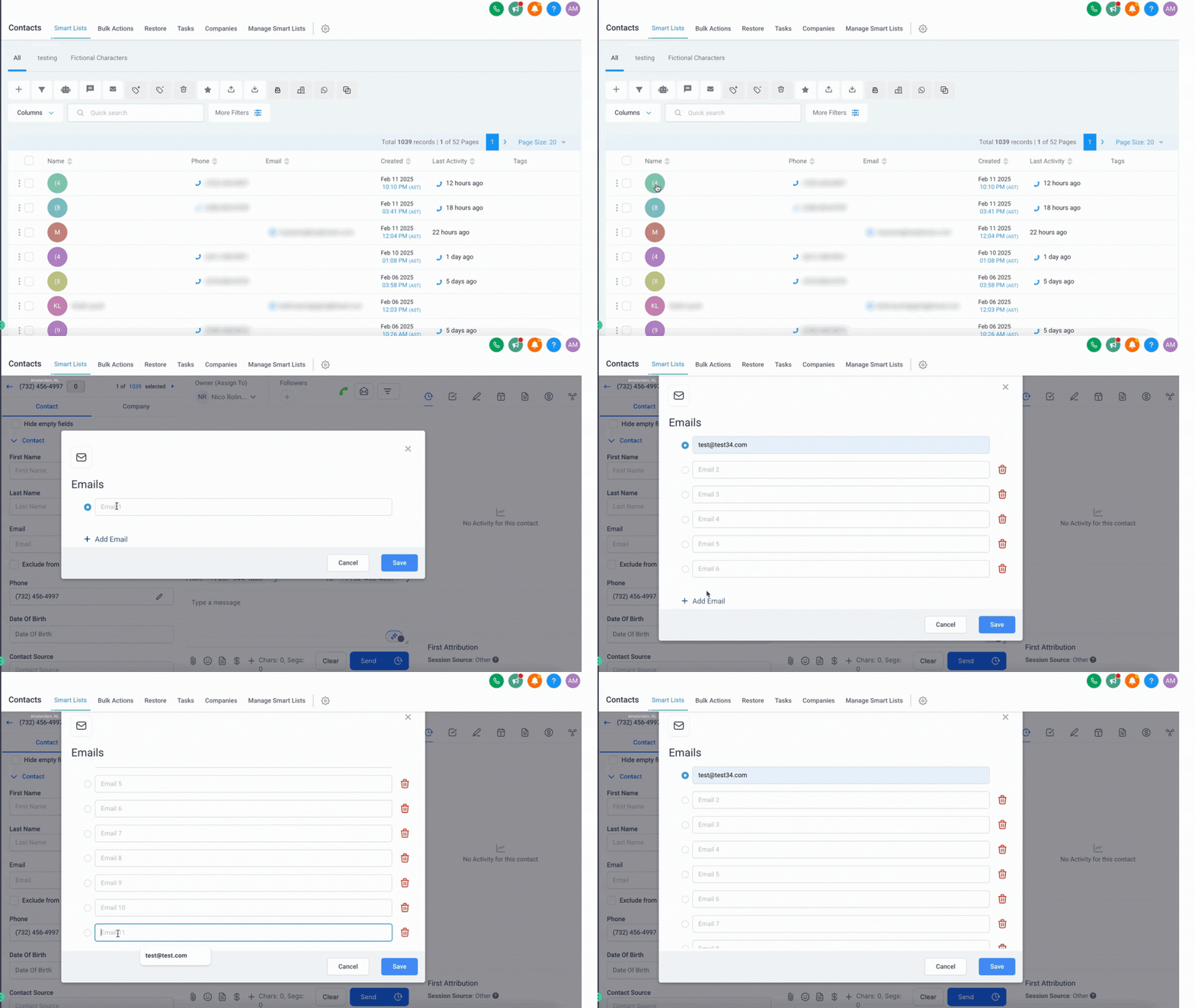
Let op: Je kunt tot 10 extra e-mailadressen toevoegen (voor een totaal van 11, inclusief het primaire). De knop E-mail Toevoegen verdwijnt wanneer de limiet is bereikt.
Het Selecteren van het Primaire E-mailadres
Byboostify stelt je in staat om meerdere e-mailadressen aan een contact toe te voegen, maar slechts één e-mailadres kan worden aangewezen als het primaire e-mailadres voor uitgaande communicatie.
Scroll naar de sectie E-mailadres en klik op het sterpictogram naast het e-mailadres dat je als primair wilt aanwijzen. Om het primaire e-mailadres te wijzigen, ga je naar de sectie E-mailadres van het contact en klik je op het sterpictogram naast het e-mailadres dat je primair wilt maken.
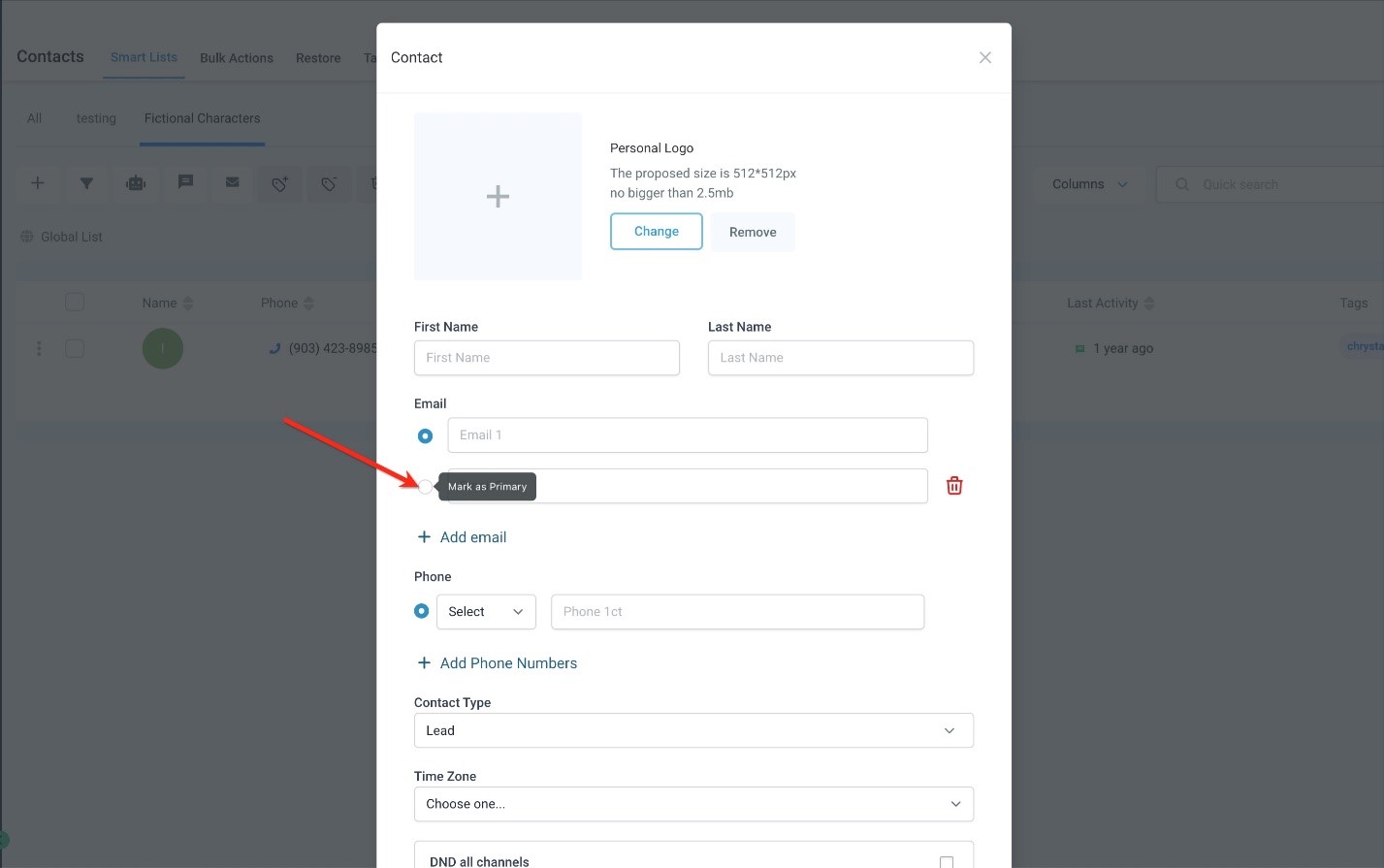
Het primaire e-mailadres zal worden gebruikt voor alle e-mailcampagnes, automatiseringen en handmatige e-mails. Als deze functie is ingeschakeld, kunnen secundaire e-mailadressen worden gebruikt voor toekomstige e-mailcommunicatieondersteuning.
Als je met een grote contactenlijst werkt, stelt Byboostify je in staat om meerdere e-mailadressen via CSV te importeren. Zie Volledige Gids: Contacten Importeren.
Veelgestelde Vragen
Q. Kan ik e-mails naar secundaire e-mailadressen verzenden?
Nee, alleen het primaire e-mailadres wordt gebruikt voor het verzenden van e-mails. Toekomstige ondersteuning voor secundaire e-mails kan echter worden geïntroduceerd.
Q. Hoeveel e-mailadressen kan ik per contact toevoegen?
Je kunt tot 10 extra e-mailadressen toevoegen, plus één primair—dus in totaal 11.
Q. Kan ik het primaire e-mailadres wijzigen nadat het is ingesteld?
Ja! Je kunt het primaire e-mailadres op elk moment wijzigen door op het sterpictogram naast het gewenste e-mailadres te klikken.
Q. Kan ik contacten in bulk bijwerken om een nieuw primair e-mailadres toe te wijzen?
Je kunt contacten exporteren, de kolom voor het primaire e-mailadres bijwerken en de gegevens opnieuw importeren, maar niet direct.
How to Manage Multiple Email Addresses for a Contact
This article will show you how to manage and add multiple email addresses for a single contact in Byboostify! You can manually add up to 10 additional email addresses per contact (excluding the primary email address), designate a primary email for campaigns, import multiple email fields via CSV, and even merge duplicate contacts while retaining their emails.
TABLE OF CONTENTS
What is Managing Multiple Emails in Contacts?
Key Benefits of Managing Multiple Emails
How to Add Additional Email Addresses to a Contact
Selecting the Primary Email Address
Frequently Asked Questions
Related Articles
What is Managing Multiple Emails in Contacts?
Byboostify allows you to associate multiple email addresses—up to 11—with a single contact profile. This is especially helpful for contacts who use different email addresses for personal, business, or project-based communication. You can store these addresses in one place and assign a primary address for all outbound messaging, helping you keep your communications centralized and accurate.
Key Benefits of Managing Multiple Emails
Managing multiple emails for a single contact streamlines communication and prevents duplicate entries in your CRM.
Maintain multiple email addresses under one unified contact profile.
Assign one primary email address for all outbound communication.
Store secondary email addresses for future support or tracking.
Import multiple emails for a contact using CSV import.
Merge duplicate contacts and retain all associated email addresses.
How to Add Additional Email Addresses to a Contact
Sometimes, a contact may use multiple email addresses for different purposes—business, personal, or project-based communications. Byboostify allows you to store up to 11 email addresses per contact, ensuring that all relevant emails are accessible within a single profile. You can manually add up to 11 email addresses per contact.
Step 1
Navigate to Contacts and open a contact profile.
Step 2
Click the Contact button and scroll to the Email Address field.
Step 3
Click "Add Another Email," enter the new email, and click
.
Please Note: You can add up to 10 additional email addresses (for a total of 11, including the primary). The Add Email button will disappear after the limit is reached.
Selecting the Primary Email Address
Byboostify allows you to add multiple email addresses to a contact, but only one email can be designated as the primary email for outbound communications.
Scroll to the Email Address section and click the star icon next to the email address you want to designate as primary. To change the primary email, go to the contact’s Email Address section and click the star icon next to the email you want to make primary.
The primary email will be used for all email campaigns, automation, and manual emails. If this feature is enabled, secondary email addresses may be used for future email communication support.
If you're working with a large contact list, Byboostify allows you to import multiple email addresses via CSV. See Full Guide: Importing Contacts.
Frequently Asked Questions
Q. Can I send emails to secondary email addresses?
No, only the primary email address is used for sending emails. However, future support for secondary emails may be introduced.
Q. How many email addresses can I add per contact?
You can add up to 10 additional email addresses, plus one primary—so 11 in total.
Q. Can I change the primary email after it has been set?
Yes! You can change the primary email anytime by clicking the star icon next to the desired email.
Q. Can I bulk update contacts to assign a new primary email?
You can export contacts, update the primary email column, and re-import the data, but not directly.